
通过本教程,您可以将子比标签云小工具美化得更加美观,实现未选中时标签块变灰、选中后颜色加深的效果。
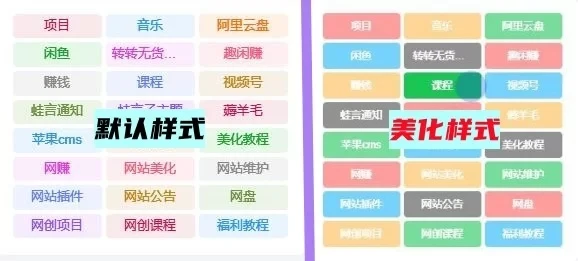
美化效果说明
美化后未选中的标签块会呈现灰色效果,选中之后颜色就会变深,让您的网站标签更加醒目美观。
部署步骤
- 添加Zibll标签云小工具,设置参数时选择固定宽度,标签数量设为3的倍数
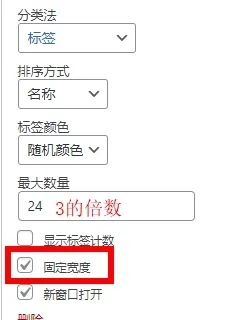
- 将下方CSS代码复制到:子比主题→自定义CSS样式
美化CSS代码
/*文章随机彩色标签*/
.widget-tag-cloud.fixed-width .but:hover{opacity: 1;}.widget-tag-cloud.fixed-width .but{opacity: 0.6;line-height: 20px !important;padding: 4px 10px !important;font-size: 12px !important;}.widget-tag-cloud.fixed-width .but:nth-child(5n){background-color: #4A4A4A;color: #FFF}.widget-tag-cloud.fixed-width .but:nth-child(5n+1){background-color: #ff5e5c;color: #FFF}.widget-tag-cloud.fixed-width .but:nth-child(5n+2){background-color: #ffbb50;color: #FFF}.widget-tag-cloud.fixed-width .but:nth-child(5n+3){background-color: #1ac756;color: #FFF}.widget-tag-cloud.fixed-width .but:nth-child(5n+4){background-color: #19B5FE;color: #FFF}
/*文章随机彩色标签*/